• Home
  • About

Snippet IT

IT News, Programming, Internet and Blogging

  • Programming and Scripting
  • Tips and Tricks
  • Software and Hardware
  • New and Happening
You are here: Home / Tips and Tricks / Gmail: Inserting Images

Gmail: Inserting Images

April 13, 2009 by Sze Hau Leave a Comment

Gmail provides no way to embed images, Youtube videos, sophisticated table layouts, Flash animation movies, inline podcast players like odeo, and etc. There is a copy and paste tricks that allow you to embed images into your rich text email in Gmail. You are actually copying a rendered HTML from either an existing web page or WYSIWYG HTML editor.
Gmail-Inserting-Images 


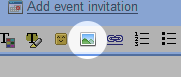
Google Labs introduce a new feature in Gmail called Inserting Images that allows user to insert images into email body without having to use the attachment option. You can insert the images by uploading a file or from an URL source. Also make sure you are using rich text formatting to compose your email or else you will not see the inserting images feature.

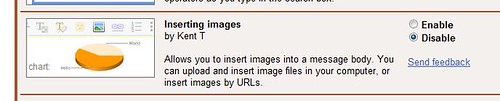
To enable this features, login into your Gmail, click the “Settings” link on top-right of the page. Click on “Labs” link under the settings. Scroll the page down until you see the “Inserting Images” feature. Enable the feature and remember to save changes by clicking the “Save Changes” button at the bottom of the page.
Gmail-Inserting-Images 

Filed Under: Tips and Tricks Tagged With: Gmail, how to

About Sze Hau

Geek. Love programming. Coffee addicted. Married with two children. Working towards financial freedom.

Leave a ReplyCancel reply

Advertisement

Email News Letter

Sign up to receive updates daily and to hear what's going on with us

Software and Hardware

MD5 and SHA1 Checksum Using Windows

July 5, 2017 By Sze Hau Leave a Comment

Blog Network

  • Personal Fincance Personal Finance – Personal Money Tips, Stock Investment, Small Business and Make Money Online
  • szehau's weblog Life, Internet, Software, Gadgets, Programming and Investments

Snippet IT

This is the place where I want to share anything about information technology.

Search

Recent

  • MD5 and SHA1 Checksum Using Windows
  • MD5 and SHA1 Checksum Using Linux
  • Java: Unlimited Strength Jurisdiction Policy
  • WordPress: How To Change Admin Username
  • Linux: How To Compress And Decompress Folders And Files

Tags

advertisement blog C# Chrome DecimalFormat EGPC Float format format Integer free icons Gmail Google Google Adsense Google Chrome Google Search Engine Google search result how to HTTP Java JavaScript Linux money password performance PHP programming search engine optimization secure security short URL site value spam SQL static constructor String thread tiny URL Tips and Tricks trackback twitter video Wordpress wordpress plugin wordpress theme Youtube

Copyright © 2025 · Magazine Pro Theme on Genesis Framework · WordPress · Log in